LokLok is a mobile app that lets you stream movies, TV series, and short dramas from one place, with the option to download episodes for offline viewing. If you’ve just installed it and aren’t sure where to start, or you’ve been using it for a while but keep missing features like offline downloads or subtitle switching,g this guide walks through exactly how to use LokLok, what kind of content it offers, and what to know before you rely on it as your main streaming app.
We’ll also cover something most guides skip: the honest picture of how the app operates, including the licensing questions around its content library, so you can make an informed decision rather than just following a tutorial blindly.
What Is LokLok?
LokLok is a free mobile entertainment app for Android and iOS that streams movies, TV series, and short-form dramas, with support for offline downloads, HD playback up to 1080p, and subtitles in multiple languages. It’s built around a simple browsing interface with categories, trending lists, search, and a personal watchlist rather than the heavier production-studio branding you’d see on a service like Netflix or Disney+.
The app exists in several near-identical versions across app stores (different developer names, similar branding and features), which is worth knowing if you’re trying to find “the real one” — more on that in the safety section below.
How to Download and Set Up LokLok
Getting started takes a few minutes:
- Search for the app. On Android, open the Google Play Store and search “LokLok.” On iPhone, use the App Store. Check the developer name and recent reviews before installing, since multiple similarly named apps exist.
- Install and open the app. No account is strictly required to browse, though you may be prompted to sign in (often via a quick social or email login) to save favorites and sync your watch history.
- Set your preferences. On first launch, LokLok usually asks about preferred genres or language — this shapes your homepage recommendations, so it’s worth answering honestly rather than skipping.
- Grant permissions. If you plan to download episodes for offline playback, allow storage access when prompted; otherwise downloads won’t complete.
Once that’s done, you’re on the home screen, which is where the actual “how to use LokLok” part begins.
How to Use LokLok: Navigating the App
The home screen is organized around a few key areas:
- Trending/For You: A rotating selection based on popularity and your viewing history.
- Categories: Movies, TV series, and short dramas are typically split into separate tabs so you’re not scrolling through mixed content types.
- Search bar: The fastest way to find a specific title, actor, or genre is useful once you know what you’re looking for rather than browsing blind.
- My List / Favorites: Tap the bookmark or heart icon on any title’s detail page to save it here, so you don’t lose track of something mid-series.
- Watch history: Lets you resume an episode where you left off, which matters if you’re watching a series across multiple sessions.
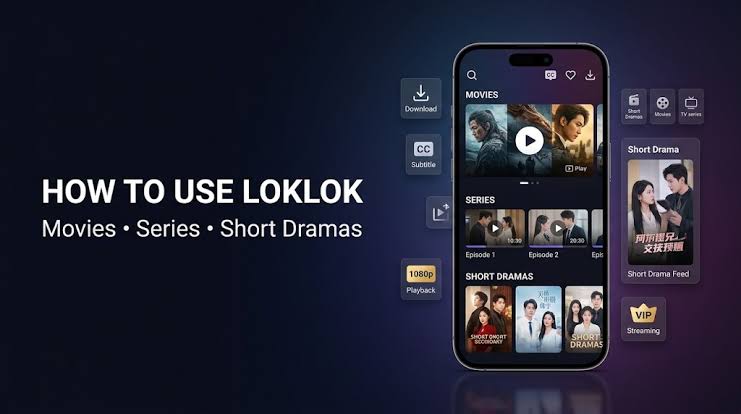
When you open a title, you’ll usually see a synopsis, available seasons or episodes, subtitle language options, and resolution settings (for example, standard vs. HD vs. 1080p). Tapping the resolution or subtitle icon during playback lets you switch on the fly without restarting the episode.
LokLok Movies and Series: What’s in the Library
LokLok’s catalog leans heavily into Asian film and television: Korean dramas, Chinese series, Japanese anime, and Southeast Asian productions alongside a rotating selection of Western movies and shows. This is one of the app’s clearer differentiators: if you’re specifically hunting for K-dramas or C-dramas with fast subtitle turnaround, LokLok’s library tends to be broader in that niche than many mainstream Western streaming apps.
Content is generally organized by:
- Genre (romance, action, thriller, comedy, and so on)
- Region/origin (Korean, Chinese, Japanese, Western)
- Trending/New releases
- Rankings (most-watched, top-rated within the app)
Search works reasonably well for exact titles, but browsing by genre and region tends to surface more of what LokLok actually does well.
LokLok Short Dramas Explained
Short dramas, sometimes called micro-dramas or mini-dramas, are a newer content format built for mobile viewing: episodes typically run a few minutes each, structured with quick cliffhangers so you keep tapping “next episode.” LokLok has leaned into this format alongside its traditional movie and series library, positioning short dramas as a separate content type rather than mixing them into regular series listings.
This matters for how you use the app: if you’re only interested in full-length series or movies, you can generally skip the short-drama tab entirely and stick to the Movies/Series categories. If you enjoy quick, episodic storytelling you can finish during a commute or a break, the short-drama section is worth exploring on its own; it behaves more like a vertical-video feed than a traditional watch queue.
Downloading Content for Offline Viewing
One of LokLok’s more practical features is offline download support, useful for travel, limited data plans, or unreliable connections.
- Open the title you want to save.
- Look for the download icon, usually next to the episode list or playback controls.
- Choose a resolution; lower resolutions download faster and use less storage, higher resolutions look better but take longer.
- Access downloaded content through a dedicated “Downloads” or “Offline” tab, separate from your streaming history.
A few practical notes: downloaded episodes can expire or become unplayable after app updates or extended inactivity, and available download resolution is sometimes capped for free (non-VIP) users. If a download fails repeatedly, it’s usually a storage-space or connectivity issue rather than an app bug clearing some device storage often resolves it.
LokLok VIP: What You Get and Whether It’s Worth It
LokLok operates on a freemium model. Free users can stream and download content, generally with ads and some restrictions (lower max resolution, limited simultaneous downloads, or slower access to newly added episodes). A VIP or premium tier is sometimes unlocked via subscription and sometimes through in-app engagement features like voting or watching ads; it typically removes ads and unlocks higher-resolution playback and faster access to new content.
Whether VIP is “worth it” depends on how you use the app. If you mainly watch occasionally and don’t mind ads, the free tier covers the basics fine. If you’re downloading frequently in HD or binge-watching new releases the day they land, the free-tier limitations become more noticeable.
Is LokLok Safe and Legal?
Short answer: LokLok’s legality is genuinely unclear and varies by content and region. A meaningful portion of its library appears to be streamed without confirmed licensing agreements with the original copyright holders, which puts it in a legal gray area similar to other free streaming apps that aren’t affiliated with studios or official distributors.
This is worth taking seriously rather than skipping past. A few points to weigh:
- Copyright licensing: Legitimate streaming platforms (Netflix, Disney+, Hulu, regional broadcasters) pay licensing fees to studios and rights holders. Apps offering the same catalog for free, with no visible licensing partnerships, are typically doing so without those agreements, which is where copyright infringement concerns come from.
- Device safety: Because LokLok and similar apps aren’t always distributed exclusively through official app stores (and multiple near-identical clones exist), there’s added risk in downloading from unofficial sources, outdated versions, bundled unwanted software, or apps impersonating the real one.
- Regional laws vary: Streaming copyrighted content without a license carries different legal weight depending on your country. In some places,s enforcement targets distributors rather than individual viewers; in others, streaming itself carries liability. It’s worth understanding your local copyright law rather than assuming the rules are the same everywhere.
- Practical risk vs. legal risk: Using the app itself isn’t the same as running malware, but it does mean relying on a service without the accountability, consistent uptime, or content guarantees that licensed platforms provide.
None of this means the app won’t work as advertised for many users; rs it does. But going in with clear eyes about how the content is sourced is part of using it responsibly.
Common Problems and Fixes
- App crashes or won’t load content: Usually resolved by clearing the app cache or reinstalling; also check for a pending update.
- Downloaded episodes disappear or won’t play: Often tied to app updates invalidating older downloads; re-download the affected episodes.
- Buffering during playback: Lower the resolution setting, which reduces the bandwidth the app needs in real time.
- Missing subtitles for a specific language: Not every title has every subtitle track; check the language menu during playback rather than assuming it’s a bug.
- Can’t find a specific title: Try searching by the original (non-translated) title or actor name;e regional titles sometimes don’t match direct English translations.
Frequently Asked Questions
Is LokLok free to use?
Yes, LokLok is free to download and use for streaming and downloading content, though it includes ads and some feature limits for non-VIP users, such as capped download resolution and slower access to new releases.
Is LokLok safe to download?
LokLok’s app itself generally passes standard security scans, but because multiple similarly named clone apps exist and it isn’t distributed through official studio partnerships, it’s safest to install only from the official Google Play or App Store listing and keep the app updated.
Is LokLok legal?
LokLok operates in a legal gray area. A significant portion of its content library appears to be streamed without confirmed licensing agreements with copyright holders, which raises copyright concerns similar to other unaffiliated free streaming apps legality also varies depending on your country’s copyright enforcement laws.
Can I download movies and episodes on LokLok for offline viewing?
Yes. Open a title, tap the download icon near the episode list, choose a resolution, and access saved content later through the app’s Downloads tab. Free users may have lower resolution or download limits compared to VIP users.
What are LokLok short dramas?
Short dramas are brief, episodic mini-series designed for quick mobile viewing, usually a few minutes per episode with cliffhanger endings. They’re organized separately from LokLok’s regular movies and series library.
Conclusion
LokLok is straightforward to use once you know where the download button, subtitle menu, and short-drama tab actually live; the learning curve is mostly about discovering features rather than any real complexity. Where it gets more nuanced is the content-sourcing question: it’s not a studio-backed platform, and being upfront about that trade-off is more useful than pretending the app is a like-for-like Netflix replacement. If you decide to use it, sticking to the official app store listing, keeping the app updated, and being selective about what you download will get you the most out of it with the least hassle.